The Best and Worst Interior Design Software
If you’re an interior designer, or an aspiring interior designer, this post is a must-read. Why? Because as a designer deeply immersed in all things interior design and tech, I’m here to break down the most popular and well-known interior design software catered specifically to professionals like us.
Let me be upfront—I’ve only extensively used two interior design software platforms, DesignFiles and Ivy (which has dissolved by Houzz Pro…which I have also dabbled in). However, I’ve done my research and feel confident enough to offer a fair comparison of these tools alongside others in the market.
Ready to dive in? Let’s go!
In this post, I’ll be breaking down the pros and cons of five top interior design software platforms for professionals:
Click to jump.
NEW: Click here for my review of Programa.

The rapid advancement of technology in the interior design industry has given rise to a plethora of software options aimed at simplifying workflows, improving client communication, and streamlining project management. Among the most notable are Houzz Pro, DesignFiles, and Mydoma, each offering unique features to cater to designers’ needs. This blog dives into a comparison of these tools and other comparable software to help you decide which one best suits your business.
1. Houzz Pro

Overview:
Houzz Pro, which has made Ivy now obsolete, is an all-in-one platform for interior designers and contractors. It’s tailored to combine project management, client communication, and marketing in one seamless tool.
My main issue with Houzz Pro lies in how it integrates product sales into its platform. It feels like Houzz Pro is more interested in selling items directly to designers’ clients. For instance, when you create a mood board, the software automatically matches products from their inventory, allowing clients to shop these items directly, potentially cutting designers out of the sales process. For me, that’s a dealbreaker.
That said, the software itself is well-designed and user-friendly, offering solid tools for project management and client collaboration. However, the focus on direct-to-client sales is something to consider carefully before diving in.
Key Features:
- Project Management: Create proposals, track invoices, and manage timelines.
- Client Communication: Offers a client dashboard for sharing updates, proposals, and designs.
- Marketing Tools: Helps designers generate leads through Houzz’s platform and track project analytics.
- Product Library: Extensive database for sourcing and linking products directly to projects.
Pros:
- Integration with the Houzz marketplace expands sourcing options.
- Built-in lead generation through Houzz’s established user base.
- Intuitive interface with visually appealing tools.
Cons:
- Pricing can be steep for small-scale designers.
- Primarily beneficial for designers already using Houzz’s ecosystem.
what designers are saying about houzz pro
Well, word on the interior design street is that designers aren’t happy about Houzz Pro taking away Ivy — a platform that designers loved. Houzz Pro is less industry-specific, and from what I’ve seen, it’s not a platform many designers truly enjoy.
2. DesignFiles

Overview:
DesignFiles is designed for designers looking for a simple yet comprehensive tool to manage projects, create mood boards, and collaborate with clients.
Spoiler alert: I have been using DesignFiles for years now, and it’s my top pick. Read my extensive review here: A Designer’s Review of DesignFiles: The Best Interior Design Software?
Key Features:
- Drag-and-Drop Mood Boards: Easily create stunning visual presentations.
- Client Portal: Share proposals, mood boards, and invoices in one place.
- Product Library Integration: Source products from popular vendors or add your own.
- Automated Proposals and Invoices: Speed up the financial aspect of projects.
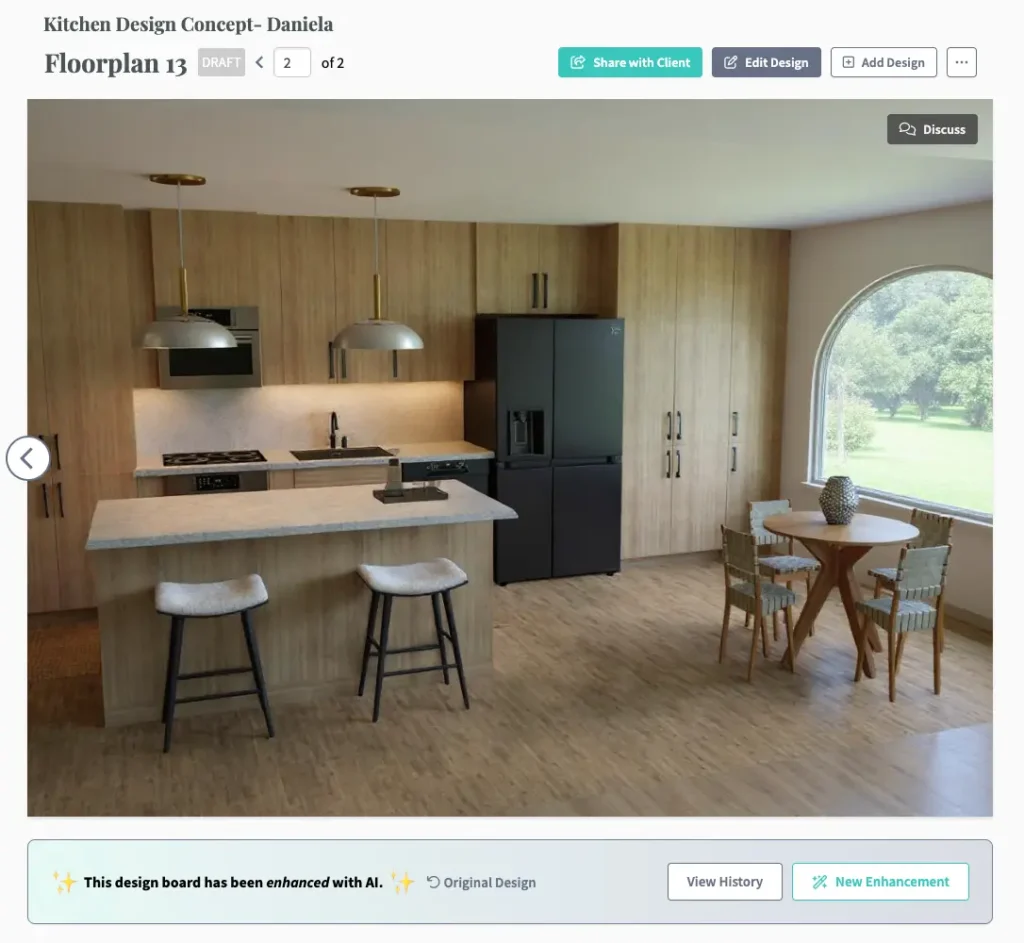
- Enhance with AI Tool: Make your 3D visuals photo- realistic with the Enhance with AI Tool.
Pros:
- Affordable pricing compared to other platforms.
- Excellent for visual presentations and client collaboration.
- User-friendly interface that’s great for small to medium-sized businesses.
- Built in AI enhance tool.
Cons:
- The 3D rendering can lag at times.
what designers are saying about designfiles
Designers who use DesignFiles are committed, because DesignFiles offers so much more than just interior design software — it provides community, education, and real support. They have a very active Facebook group, and they take user feedback seriously. They offer both full-service designers and e-designers a wide range of webinars and resources tailored to help grow their businesses. This software continues to evolve, and the team is very transparent about what’s coming down the pipeline — including new AI integrations and expanded customization options.
3. Mydoma Studio

Overview:
Mydoma Studio is a robust interior design software focused on streamlining workflows and improving client communication. It caters to designers looking for an all-in-one solution. Mydoma’s focus on delivering exceptional solutions for lead generation, project management, and time tracking has led the company to great success, particularly with smaller firms or those that have recently formed.
Key Features:
- Project Management: Track milestones, timelines, and deliverables.
- Client Collaboration: A centralized portal for sharing designs, documents, and feedback.
- Product Library and Proposals: Build custom product lists with pricing and easily create proposals.
- Integrations: Compatible with tools like QuickBooks and Zapier for additional functionality.
Pros:
- Strong emphasis on client collaboration.
- Excellent integration options for expanding functionality.
- Ideal for designers who prioritize detailed project tracking.
Cons:
- The learning curve can be steep for beginners.
- Advanced features may not be necessary for smaller projects.
what designers are saying about mydoma
Word on the street is that Mydoma has changed — and not for the better. Designers are saying it has become glitchy and difficult to use. So, while Mydoma has been a strong contender for years, it seems many designers are now leaving the platform in search of something less clunky and more reliable.
4. Studio Designer

Overview:
Studio Designer is a powerhouse in the world of interior design software, particularly for established firms and designers managing large-scale projects. Known for its advanced financial tools and robust project management features, Studio Designer is a favourite among professionals who need an all-encompassing solution for running their design business.
Key Features:
- Comprehensive Accounting Tools: Studio Designer sets itself apart with its integrated accounting features, including billing, expense tracking, and financial reporting. It’s a one-stop shop for managing a project’s financial aspects, from vendor invoices to client payments.
- Project Management: The platform offers tools to manage timelines, track deliverables, and organize vendor communications, making it easier to stay on top of multiple projects simultaneously.
- Product and Resource Library: Designers can create and maintain detailed catalogs of furniture, fixtures, and other products, complete with pricing and supplier details.
- Client Collaboration: The platform includes client-facing tools, such as proposal approvals and real-time updates on project progress, enhancing transparency and trust.
- Integrations: Studio Designer integrates with QuickBooks and other software, providing flexibility for firms that use additional tools for bookkeeping or project management.
Pros:
- Tailored for High-End Designers: Its features are specifically designed to meet the needs of interior design firms handling complex, high-budget projects.
- All-in-One Solution: With accounting, project management, and client collaboration in one place, it eliminates the need for multiple software subscriptions.
- Customizable Reports: The ability to create detailed financial and project reports is a significant advantage for tracking progress and profitability.
Cons:
- Steep Learning Curve: The extensive features can be overwhelming for new users, especially solo designers or those new to project management software.
- High Cost: Studio Designer’s pricing reflects its comprehensive capabilities, making it better suited for larger firms or designers with higher budgets.
- Less Visual: While excellent for back-end operations, it lacks the visual presentation tools found in software like DesignFiles or Mydoma.
what designers are saying about studio designer
Honestly, I don’t hear a lot of buzz about Studio Designer. What it suggests to me is that it may not be as popular as some of the other platforms. From what I’ve seen online, the reviews are a mixed bag.
5. Insight Design Studio
.png)
OVERVIEW:
Insight Design Studio stands out from the others on this list. Rather than being traditional software, it offers a collection of robust templates for interior designers, most notably The Design Studio HQ V2.0. This all-in-one Notion workspace covers everything from project management and client portals to feedback systems, contractor communication, team scheduling, and FF&E tracking. Instead of paying a recurring software subscription, you make a one-time purchase and get everything in one centralized place.
Key Features:
- Project Management: Track milestones, timelines, and project phases all in one place.
- Client Portals: Provide clients with their own space for mood boards and project updates.
- Client Feedback Flows: Organized systems to collect and manage client revisions efficiently.
- Contractor Communications: A centralized hub for RFIs and contractor information.
- Team Workload Tracking: Monitor task assignments and keep track of team members’ vacation time.
- FF&E Scheduling: Organize products room by room, complete with cost tracking.
PROS:
- One-time cost: No recurring subscription fees.
- Everything in one place: No more juggling multiple apps.
- Customizable: Tailor it yourself—no waiting on developers to add the features you need. Build it yourself or get help.
- Designer-made: Created by a designer who truly understands your workflow.
CONS:
- Dependent on Notion: If their servers go down or they make changes, you’re affected too.
- Learning curve: Notion can feel intimidating at first, but once you get the hang of it, it’s pretty easy to navigate.
- Printing challenges: Exporting to PDF can be tricky—Notion is really designed for online use, not for printing.
Which Interior Design Software Should You Choose?
Choosing the right software depends on your business needs, client base, and budget. My pick is DesignFiles or, if you are just starting your business, a template from Insight Design Studio.
DesignFiles, it is user-friendly, versatile, and my clients are impressed by the platform I use, and my abilities, of course. The platform caters to both e-designers and full-service designers, allowing you to invest in the tools that best suit your business needs.
Insight Design Studio templates, notably The Design Studio HQ V2.0 is an amazing option if you are just starting and feel intimidated by a recurring cost.
NEW Read my comparison on the 10 most popular softwares for interior designers: The Best All-In-One Software For Interior Designers
Each tool has its strengths and weaknesses, so identifying what matters most to your workflow will help you make the right choice. Whether you’re an experienced designer managing a large team or a solo entrepreneur just starting out, there’s a software solution designed to support your unique needs.
Click Here To Shop My Favourite Home Goods
Let’s design your space together, virtually.